
TABLE OF CONTENTS
Google Ads can help home care agencies reach families who need care now. Yet many accounts waste money from the start by targeting the wrong searches, sending clicks to weak pages, or counting every call as a good lead.
A better plan starts with one goal: create more qualified care inquiries. From there, the account should track which leads book an assessment. It should also track which assessments become clients.
The best starting point is a focused Search campaign. Campaigns should use clear keywords, strong filters, matching landing pages, and full lead tracking. Most new accounts should not start with broad automation. They first need clean data and a clear view of lead quality.
If you are already running campaigns and are not sure where performance is breaking down, a Home Care Marketing Audit can help identify whether the problem is coming from targeting, tracking, landing pages, lead quality, or another part of the acquisition process.
Define a Qualified Lead Before You Build
Google Ads cannot find the right leads until you define them.
A qualified lead may need to:
- Live in the service area
- Need a service your agency offers
- Meet your minimum care hours
- Have a clear payment plan
- Need care within a set time
Share this list with your intake team. Then use the same rules in your reports. This keeps marketing and sales focused on the same goal.
1. Start With a Search Campaign
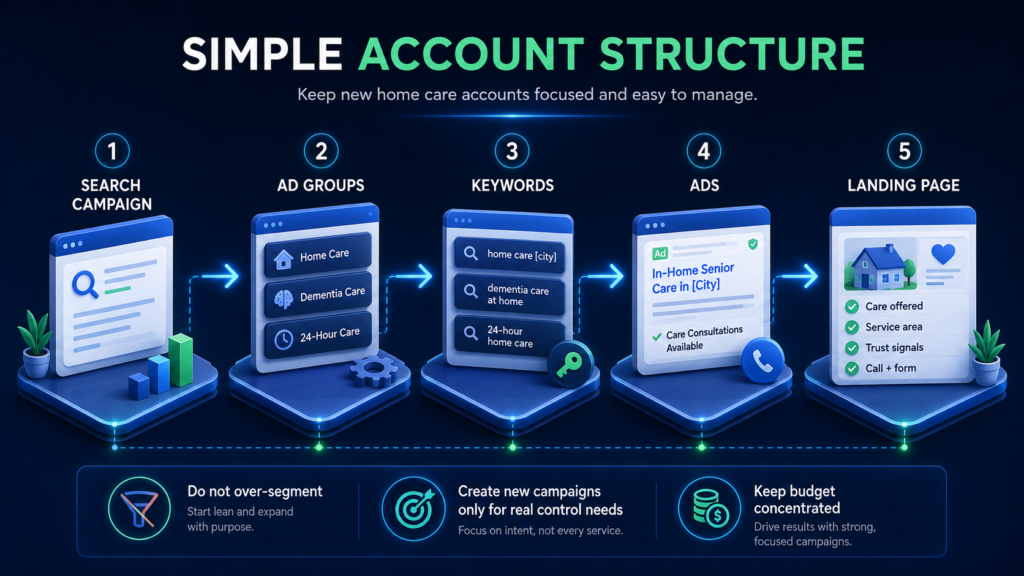
Search ads reach people who are looking for care. They also give you more control at launch. You can choose the keywords, areas, hours, ads, and landing pages.
Do not split the account more than needed. A small agency may need one main campaign. It can use separate ad groups for home care, dementia care, and round-the-clock care.
Create a new campaign only when you need separate control. Common reasons include a new budget, service area, care type, or landing page.
This keeps the account simple and also gives each campaign enough traffic to learn.
Search is often a strong fit when the goal is capturing families who are already looking for care, but it serves a different role than channels built around awareness or retargeting.
Our guide to the best advertising platforms for home care agencies compares Google Search with Meta, Microsoft Ads, Nextdoor, and other options.
Choose the Right Location Setting
Google lets you target people in an area. You can also target people who show interest in that area. The default setting includes both groups.
This matters in home care. An adult child may live in another state. Yet they may search for care near a parent.
Use Presence when remote searches often create poor leads. Test Presence or Interest when family members often search from afar. Review lead quality by location before you choose.
2. Focus on High-Intent Keywords
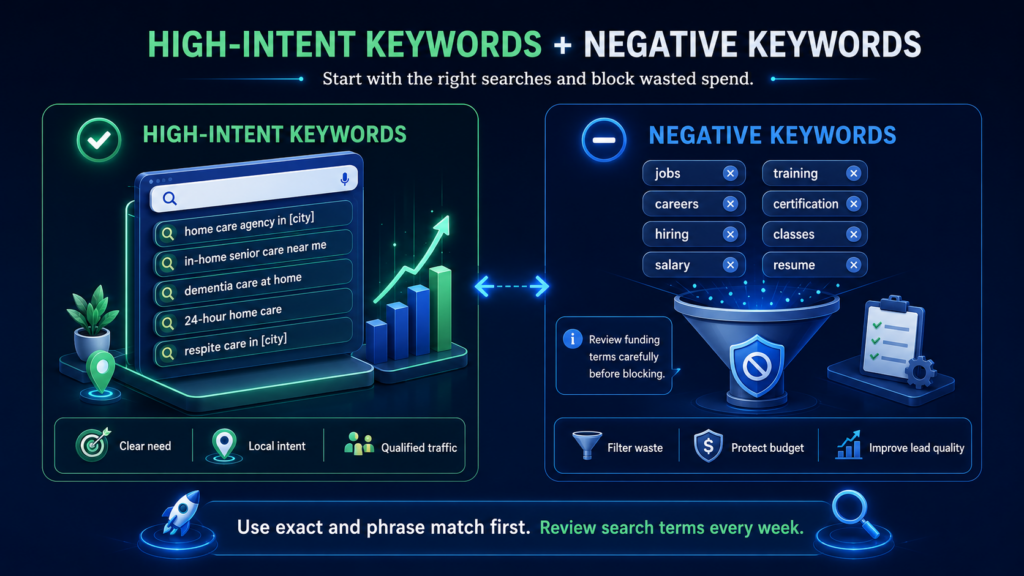
Start with searches that show a clear need for care.
Good keyword themes include:
- Home care agency in [city]
- In-home senior care near me
- Dementia care at home
- 24-hour home care
- Respite care in [city]
Use exact and phrase match first. These match types give a new account more control. They also make search term reviews much easier.
Broad match can reach more searches. Google says it works best with Smart Bidding. Smart Bidding uses Google’s system to change bids for each search.
Yet a new account may not have enough good data for that setup.
Test broad match later. First, build a strong list of negative keywords. You also need clean lead tracking and regular search term reviews.
Block Clear Sources of Waste
Job and training searches are common in home care accounts.
Start with negatives such as:
- Jobs
- Careers
- Hiring
- Salary
- Training
- Certification
- Classes
- Resume
Be careful with payment terms. Searches for Medicare or Medicaid do not always mean a bad lead. Some families check payment options before they call.
Block terms only when the search shows a poor fit. Do not remove a whole group without checking the data.
Negative keywords are only one source of wasted spend. Our full guide to cutting Google Ads waste for home care agencies covers match types, search terms, geographic targeting, conversion tracking, landing pages, and other common leaks.
3. Match the Ad to the Search
A good ad should answer four simple questions:
- What care do you offer?
- Where do you offer it?
- Why should a family trust you?
- What should they do next?
Use clear claims you can prove. Good examples include:
- In-Home Senior Care in [City]
- Dementia Care at Home
- Care Calls Answered Seven Days
- Serving [City] Since [Year]
Avoid broad claims such as “best care.” They add little value and may feel false.
Keep the same message from the search to the page. A dementia care search should lead to a dementia care ad. That ad should then lead to a dementia care page.
Google uses ad fit, expected clicks, and page experience to help score ad quality. Quality Score is only a guide. It is not the final business goal.
Use Ad Assets With Care
Call assets can help families call from the search page. Run them when your team can answer. Missed calls can waste strong leads.
Sitelinks can point to key care pages. Good choices include dementia care, respite care, reviews, and service areas.
Use a location asset only for a real business location. The linked profile should also support the ad goal.
4. Build a Focused Landing Page
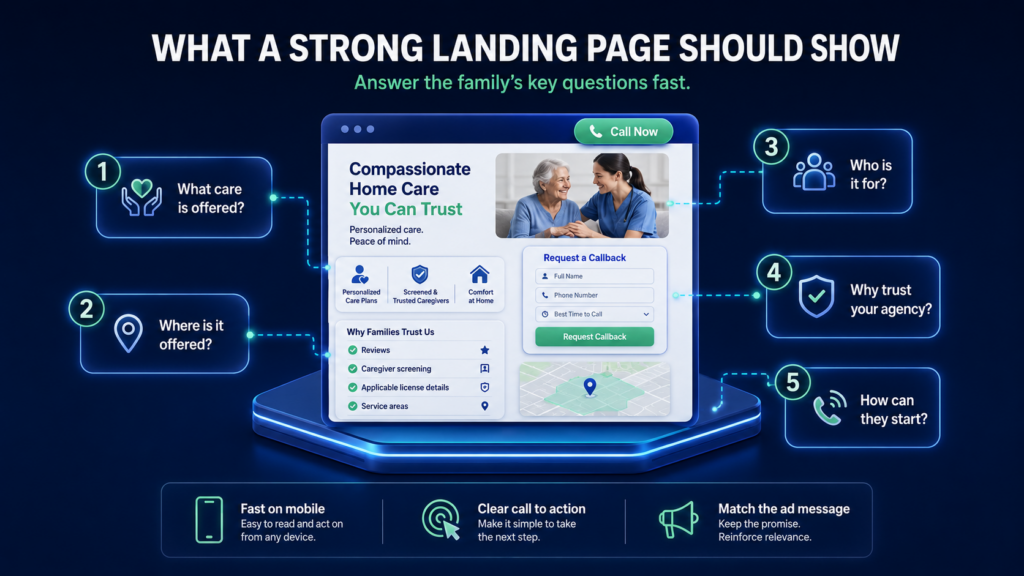
Most ads should not lead to a broad home page. A focused page gives the visitor a clear path.
The page should answer five questions fast:
- What care is offered?
- Where is it offered?
- Who is it for?
- Why should the family trust you?
- How can they start?
Place a call button near the top. Add a short form for people who want a callback.
Use trust points that matter in home care. These may include reviews, licenses, caregiver checks, years in business, and service areas.
Keep the page easy to read on a phone. Use short sections, clear headings, and simple forms. The ad and page should use the same main terms.
Google includes page value, ease of use, and message fit when it reviews the landing page experience.
Paid traffic can only perform as well as the experience it lands on. Our guide to building a home care website that converts goes deeper into trust signals, mobile usability, forms, calls to action, and the path from visitor to qualified care inquiry.
5. Track the Full Path to a Client
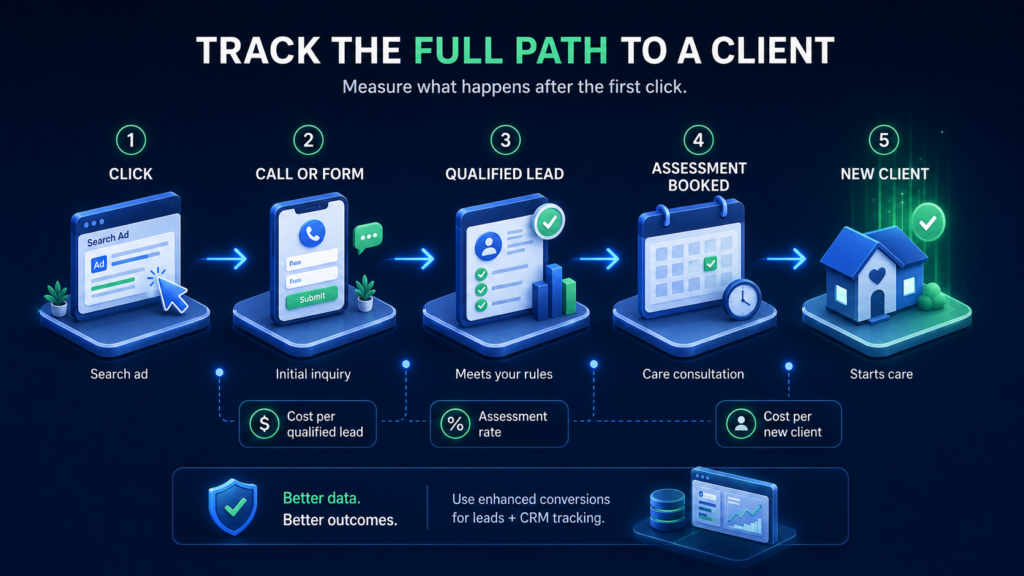
Tracking must work before the first click.
At first, track:
- Calls from the ad
- Calls from the website
- Contact forms
- Care requests
Then track what happens next.
Mark whether each lead:
- Meets your rules
- Books an assessment
- Completes an assessment
- Starts care
This is the data that matters most.
Google now supports enhanced conversions for leads. This tool can send later lead results back to Google. It helps link a new client to the ad that first brought them in. Google now directs these uploads through its updated Data Manager system.
Do not treat every action as a main conversion. Page views and short calls should stay as side metrics. Main conversions should show real lead value.
6. Set a Budget That Fits the Plan
Your budget should support the number of campaigns you run.
Use this simple formula:
Expected cost per click × daily clicks × campaigns = daily budget
For example, assume a click costs $10. You want eight clicks each day. One campaign would need about $80 per day.
Four campaigns would need about $320 per day. That may be too much for a new test.
When the budget is tight, use fewer campaigns. A simple account with enough data is better than a large account with no clear signal.
Start With a Safe Bid Plan
A new account has no proof of what a good lead looks like. Start with Maximize Clicks and firm controls. Use it to test keywords, pages, and tracking.
Do not start with Target CPA when the account has no conversion history. The system needs recent and useful results. Without them, it cannot judge a fair target.
A practical move is to wait for about 30 to 50 good conversions. These should be real calls, forms, or booked assessments. They should not be page views or weak actions.
Then test Target CPA with a sound goal. Watch both lead cost and lead quality.
7. Review Business Metrics Each Week
Clicks do not pay the bills. New clients do.
Review these numbers each week:
- Search terms
- Calls answered
- Qualified lead rate
- Cost per qualified lead
- Assessments booked
- New clients
- Cost per new client
Use click rate and impression share as clues. They can show weak ads or low reach. Use lead and client data to judge the campaign.
Build Around Admissions, Not Clicks
A strong home care campaign is easy to explain. It reaches the right search, gives the family a clear next step, and then tracks the lead through intake.
Start simple. Learn which searches create good calls. Fix the page and intake gaps. Add more automation only after the account has clean data.
Alchemical Marketing builds Google Ads plans around qualified care leads. Our Home Care Growth Audit reviews your keywords, areas, ads, pages, and tracking. The audit also shows where poor leads and missed calls may be draining your budget.
Frequently Asked Questions
How much should a home care agency spend on Google Ads?
There is no fixed budget for every agency. Start with expected click costs and the number of clicks you need each day.
For example, eight daily clicks at $10 each would need an $80 daily budget.
Should home care agencies use broad match?
Broad match can help an account reach more searches. However, Google recommends using it with Smart Bidding.
New accounts should first build clean tracking and negative keywords. Exact and phrase match offer more control during that stage.
When should a home care agency use Target CPA?
Do not start Target CPA with no conversion history.
Alchemical recommends waiting for about 30 to 50 recent, useful conversions. These actions should reflect real lead value.
Can home care agencies use Google Local Services Ads?
Google’s current United States eligibility list does not include non-medical home care or home health agencies. Home care agencies should plan around standard Search campaigns for now.
What should count as a Google Ads conversion?
Track calls and forms first. Then track qualified leads, assessments, and new clients.
The deeper results show whether the ads are helping the business grow.
Should home care ads run after office hours?
That depends on the intake process.
Keep ads running when an answering service or fast callback system is ready. Limit call-focused ads when no one can respond.